Requirements
101: User Stories vs. Use Cases

Here’s a question
that I get over and over again:
What’s the difference between user stories and use cases?
— Ron K.
Before I dive into an answer to that question, let’s
rewind a little bit and talk about where user stories came from. I like them
because they’re a great example of how the Agile movement changed the software
world. Programmers used to just dive right into software projects and start
coding. Whenever one of those pesky users started to tell us what they needed,
we’d stop them and say something like, “Don’t worry, I totally get it. I know
what you need.” The Agile folks figured out that “I know what you need”
is a nasty little trap that programmers — especially good ones — fall into.
We’d spend the whole project thinking that we understood our users’ needs, only
to deliver software that they didn’t want. The Agile folks realized that if
developers had to start working with users throughout the project to
understand their needs if they wanted to avoid the code-and-fix trap.
 Jenny and I teach you all about
use cases and requirements in our first book, Applied Software Project
Management (O'Reilly, 2005).
And that’s why I think the user story is one of the
most useful tools to come out of the Agile movement. A user story — some
people call it a scenario — expresses one very
specific need that a user has. It’s usually written out as a couple of
sentences. Most user stories are written in the language of the users, so any
user should be able to read a user story and immediately understand what it
means. A lot of time, user stories are written on index cards, although I’ve
put them in Word documents, Excel spreadsheets and Wiki pages (depending on how
the particular project is run).
A use case is
similar to a user story, because it also describes one specific interaction
between the user and the software. When I’m training people to improve the way
they write down their project’s requirements, I often describe the use case as
a “deceptively simple tool” that helps us find and write down all of the ways
users interact with the software.
Looking at those
definitions, I can definitely see why there’s confusion about the difference
between user stories and use cases. If you look at the last two paragraphs, it
might sound like I said the same thing twice! But while user stories and use
cases are definitely similar, there are important differences between them.
Each serves a distinct purpose, and I think they both have their place on a
well-run software project.
I think the easiest
way to understand the difference between use cases and user stories is to take
a look at an example. Luckily, I’ve got one that I think helps make the difference
clearer.
In our first book, Applied Software Project
Management, Jenny and I spend a lot of time talking about how to
develop use cases and use them to build better software. And as an example, we showed
a use case for a software feature that everyone should be familiar with: a
search and replace feature from a word processor. Comparing a user story for
search and replace with a use case for the same feature helps highlight the
differences.
It’s not hard to
find lots of user story examples. There are lots of different ways you’ll see a
user story formatted (although if you’re looking for a user story template, a
3×5 index card should be a good starting point!). So what would a user story
for search and replace look like? I took a stab at writing one:
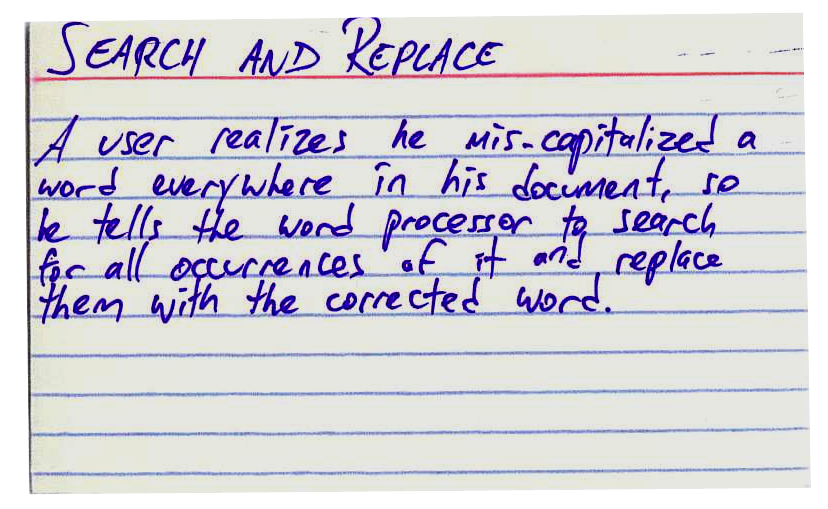
(One thing I like
to do with user stories is to use “he” or “she”, rather than try to be
gender-neutral. I think this makes the user in the story easier to connect with
by personifying him a bit. It it also lets me write in a more conversational
tone, which makes the user story friendlier and, I think, a bit easier to read
and understand.)
Now, if you’re not familiar with user stories, you
might think to yourself, “Wait a minute, my word processor’s search and replace
feature does a lot more than that!” And that’s okay. A typical user story will
have enough information to help the user understand what it is the software
needs to accomplish, but it’s not meant to be a complete description of how the
software works. I’m not going to try to give a long lesson in writing effective
user stories here; I highly recommend reading Mike Cohn’s excellent articles
and posts aboout user stories. (Mike, incidentally, is one of the
software development veterans who contributed to our latest book, Beautiful Teams [O’Reilly,
2009]. He has some really fascinating things to say about Agile planning.)
So what would a use
case sample look like for search and replace? Here’s the use case example Jenny
and I built to demonstrate how use cases work:
|
Name
|
UC-8: Search and Replace
|
|
Summary
|
All occurrences of a search term are replaced
with replacement text.
|
|
Rationale
|
While editing a document, many users find that
there is text somewhere in the file being edited that needs to be replaced,
but searching for it manually by looking through the entire document is
time-consuming and ineffective. The search-and-replace function allows the
user to find it automatically and replace it with specified text. Sometimes
this term is repeated in many places and needs to be replaced. At other
times, only the first occurrence should be replaced. The user may also wish
to simply find the location of that text without replacing it.
|
|
Users
|
All users
|
|
Preconditions
|
A document is loaded and being edited.
|
|
Basic Course of Events
|
1.
The user
indicates that the software is to perform a search-and-replace in the
document.
2.
The software
responds by requesting the search term and the replacement text.
3.
The user
inputs the search term and replacement text and indicates that all
occurrences are to be replaced.
4.
The software
replaces all occurrences of the search term with the replacement text.
|
|
Alternative Paths
|
1.
In Step 3,
the user indicates that only the first occurrence is to be replaced. In this
case, the software finds the first occurrence of the search term in the
document being edited and replaces it with the replacement text. The
postcondition state is identical, except only the first occurrence is
replaced, and the replacement text is highlighted.
2.
In Step 3,
the user indicates that the software is only to search and not replace, and
does not specify replacement text. In this case, the software highlights the
first occurrence of the search term and the use case ends.
3.
The user may
decide to abort the search-and-replace operation at any time during Steps 1,
2, or 3. In this case, the software returns to the precondition state.
|
|
Postconditions
|
All occurrences of the search term have been
replaced with the replacement text.
|
Now, if I were a
developer building a word processor or text editor, I’d actually be able to
write a search and replace feature that implements that particular use case.
(Just to be clear: there are many different use case formats; Jenny and I use
this use case template in our book because it’s stripped down to the bare
minimum sections that we think an effective use case should have.)
Here’s something about use cases that I think is
interesting. While you were reading through our use case example, were you
thinking of something that looks like the Replace dialog
in Notepad or Microsoft Word, or the Find dialog in
TextEdit? If so, take another look at the sample use case. It doesn’t have any
words like “window,” “button,” “click,” “field” or “checkbox”. It’s all about
what actions the user takes, and how the software responds. And there are many
different ways that you could build software that implements the use case. Have
you ever used the search and replace feature in vi? What about the search and replace feature in Emacs? They have very
different user interfaces! Who knew there were so many ways you could implement
search and replace? But if you compare each of them with this use case, they
all follow the same basic course of events.
So now that we’ve
gone through the use case and user story examples, what’s the difference
between user stories and use cases? Here’s what I think are some of the key
differences:
·
User
stories are about needs. When
you write a user story, what you’re describing is a “raw” user need. It’s
something that the user needs to do in his day-to-day job. If you never build
any software for him, then that need will still exist!
·
Use
cases are about the behavior you’ll build into the software to meet those
needs. A developer
who needs to build working software should be able to read a use case and get a
good sense of what the software needs to do. It typically has a lot of detail,
and describes everything that the developer needs to build in order to meet the
user’s need. That’s why it needs to have a lot more detail, and be clear and
unambiguous.
·
User
stories are easy for users to read. When you write a user story, what you’re
concentrating on is writing something that anyone can understand, in the
language of the users. We all know that developers have a lot more patience for
talking about details of the software they’re building than users do, which is
why user stories have to be brief. A user story needs to express a complete
thought in just a couple of sentences. (That’s also why it’s good to put them
on index cards: somehow, that makes it clearer that it’s self-contained and
independent of the other user stories.)
·
Use
cases describe a complete interaction between the software and users (and
possibly other systems). When
you’re doing use case analysis, what you’re doing is designing a functional solution that meets the
users’ needs. It needs to be something that developers can implement. It’s
possible that one user story could spawn several use cases. And when you
combine all of your use cases into one use case document, you’ll end up with a
complete description of every interaction between the user and the software
that you’re planning on building. And if your software has to interact with
multiple systems, you may end up treating those other systems as actors in your
use case.
Once you get a
sense of how user stories and use cases differ, you can start to see what
purpose they can serve on your project. And if you only use user stories, or if
you only use cases, then maybe on your next project you can try using them
both.
Share this:
POSTED IN AGILE, REQUIREMENTS, SOFTWARE DEVELOPMENT
Post navigation
23 thoughts on “Requirements 101: User Stories
vs. Use Cases”
2.
Pingback: Building Better Software › The perils of a schedule

in addition, here
is list of the 14 differences I’ve noticed:
5.
Pingback: User
Stories | Information Design
6.
Pingback: It’s not about the Features. « The Confianzys Blog
7.
Pingback: Blog
9.
Pingback: It’s
not about the Features. | Confianzys Blog
10. Pingback: Protect What You Pitch | Shawn Yeager + Co.
11. Pingback: Use Cases or User Stories | devblogging.com
12. Pingback: Pathetic Excuses, CTO’s in Denial & The 1st Commandment of
Software: Know Thy Customer | Software Marketing 2011
13. Pingback: Use cases vs User stories in Agile/Scrum development
16. Pingback: Proposed
Grad Course for 2013-2014: Practicing the Digital Humanities (Draft) » Roger T.
Whitson, Ph.D
17. Pingback: Methodology « Dalewilbanks's Blog
18. Pingback: Confluence: Software
19. Pingback: Confluence: UMassOnline Technology Team
20. Pingback: Classic Business Analysis Articles : Practical Analyst
21. Pingback: User stories: a beginner’s guide – Boost Blog
22. Pingback: User stories: A beginner's guide | Boost Blog
23. Pingback: How to Write Effective Agile User Stories – Agile Seeds
Leave a Reply
You must be logged in to post a comment.
This site uses Akismet to reduce spam. Learn
how your comment data is processed.
Welcome!
Our books
Head First Agile

Head First Agile is a highly visual
brain-friendly guide to help you learn important agile concepts and ideas. It
covers Scrum, XP, Lean, and Kanban, and it also helps you prepare for the
PMI-ACP certification.
Learning Agile

Learning Agile is a comprehensive guide to
the most popular agile methods, written in a light and engaging style that makes
it easy for you to learn. Read the first chapter for free!
Head First PMP

Head First PMP gets
you prepared for the Project Management Professional certification exam by
helping you become a better project manager.
Head First C#

Head First C# is
one of the most popular books for learning C#. In our opnion it's the easiest
and most fun way to do it, too!
Applied Software
Project Management
Applied Software Project
Management helps developers and project managers build
better software by diagnosing and fixing the most common project problems.
Beautiful Teams

Beautiful Teams: Inspiring and Cautionary Tales from
Veteran Team Leaders is a collection of stories and interviews with
veteran team leaders that takes you behind the scenes with some of the most
interesting teams in software engineering history.
Open
source projects we maintain
Megjegyzések
Megjegyzés küldése